
Squishy Tower Tools
Static checklists and climb planners — not an in-page app, not an executor.
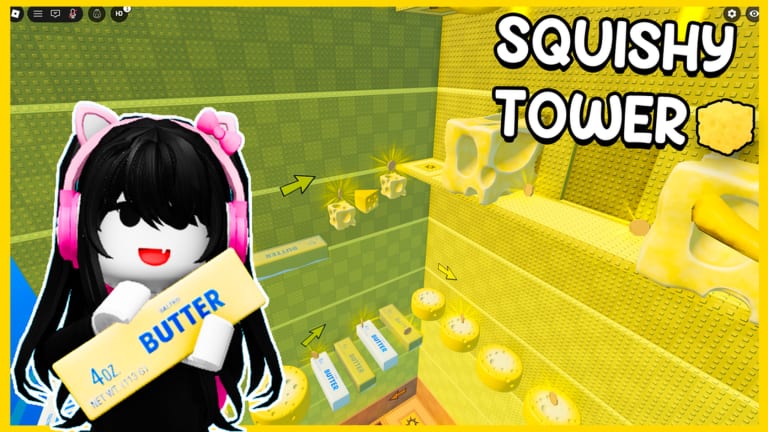
This hub holds wiki tools for Squishy Tower: printable, tickable pages you keep open on a second monitor or phone while you climb. They are static markdown. They are not JavaScript apps, not overlay macros, and not scripts. If you wanted an instant finish, that is the scripts hub, and you should read safety before you even consider it.
The first tool is the floor checklist. It lists confirmed ASMR themes from the public showcase — paws, keyboard, strawberries, dumplings, cheese, bananas, hamburger, butter, and the ASMR squishy stretch — plus blank rows for floors you discover that we have not named yet. You tick a row after a checkpoint, not after a lucky screenshot mid-fall.
What a wiki tool is for
Squishy Tower is a 50-player public climb with independent progress. Nobody is going to remember which themed pad you last stood on. The Roblox client will; your brain will not, especially after a hamburger wipe or a loud keyboard stretch. A checklist turns a wipe into a resume point.
Use these pages when:
- You are learning the tower for the first time and the getting started route is still new
- You dropped from a kill brick under a squishy and cannot remember whether cheese was above or below bananas
- You are looping for extra wins and want a shorter recap than a full how to beat reread
- You are comparing a sticky floor against the floor tier list and need the theme’s real name
- You are hunting optional coins and do not want to restick a floor you already looted
Do not use these pages as a live auto-tracker. We do not read your Roblox session. We do not tick boxes for you. If a box is empty, you have not confirmed that pad in your run.
How the floor checklist works
Open floor checklist. Keep checkpoints next to it. The loop is:
- Climb until you stand on a pad that saves.
- Tick the theme you just cleared, or the theme the pad belongs to.
- If the floor has no pad, tick it only after the next pad accepts you.
- If you discover a new theme, write it in a blank row. Do not steal names from Needoh Tower.
- After a wipe, read the last ticked row and resume from that pad instead of from spawn.
That is the whole planner. No inventory sim, no damage calculator, no Robux widget. The game is a tower obby; the tool is a list.
What these tools are not
- Not a codes redeemer. Codes, when they exist, live on codes and how to redeem. There are no public promo codes as of September 2026.
- Not a script GUI. Fly, TP, and Needoh hubs are documented separately and are ToS risks.
- Not an official Aru Games overlay. This is a fan wiki. uwucutesingle’s showcase is the visual reference; our checklist is a memory aid.
- Not a co-op assignment board. Climbs are independent even when 50 people share a server. You cannot assign a friend the dumpling floor.
Pairing tools with the rest of the wiki
A useful session looks like this:
- Warm up on controls so jump timing exists before you start ticking.
- Climb with the floor checklist open.
- When a theme feels unfair, open the tier list and the floors ranking for that name.
- When you want the full route in prose, use how to beat.
- When you are done, log the Completed badge and extra wins. Hard mode gets its own pass on hard mode.
If we add another static tool later (a coin loop order, a hard-mode toggle checklist, a badge tracker), it will land on this hub with the same rule: markdown you can tick, not a miniature app that asks for permissions.
Until then, the only tool you need between attempts is the floor list. Print it, copy it, or leave the tab open. Tick after pads. Leave undiscovered rows blank. That habit saves more runs than a mismatched Needoh loadstring, and it still lets you hear the squishies you joined the server for.
Keep this hub bookmarked beside guides rather than beside scripts. The point of a climb planner is to make the next jump obvious, not to skip the tower. When a new themed floor ships, it will show up as a blank row you can name yourself on the checklist — and only then as a named row on this wiki.
Frequently Asked Questions
Quick answers to the most common Squishy Tower questions.
Is the floor checklist an in-game tracker?
No. It is a static markdown list on this wiki. You tick boxes yourself after a checkpoint saves.
Do I need to enable scripts or a browser extension?
No. Leave executors alone. Open the floor checklist in a tab and climb on a stock Roblox client.
What floors are already named?
Paws, keyboard, strawberries, dumplings, cheese, bananas, hamburger, butter, and the ASMR squishy stretch. Blank rows are for themes you find that we have not listed.
Can I use this with friends?
You can each keep a copy. Progress is independent on public servers; ticking a box does not move anyone else.
Will you add a live interactive planner?
Not as a JS app. If we add tools, they will stay static checklists so they work in any browser without permissions.