Squishy Tower Floor Checklist
Tick confirmed ASMR themes after a checkpoint. Leave blank rows for floors you discover.
Use this page as a climb planner. It is static markdown, not a live tracker and not a script. Tick a box only after a checkpoint has saved you on or beyond that floor. If you fell through a kill brick under a squishy and landed on spawn, the box stays empty.
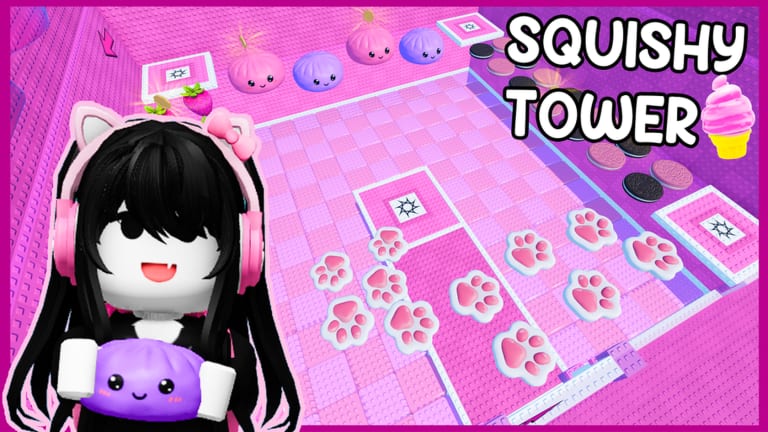
Confirmed theme names come from public showcase footage of Squishy Tower (place 97094215282943): paws, keyboard, strawberries, dumplings, cheese, bananas, hamburger, butter, and a summit stretch of ASMR squishies. Order in a live server can shift as Aru Games patches the tower. If your run meets a theme earlier or later than this list, trust the pad you are standing on, then tick the name.
Print the list, copy it into notes, or leave the tab open on a phone. Pair it with how to beat when a floor is new, and with the floor tier list when a floor is merely annoying.
How to tick
- Stand still on a pad until you are sure it is a checkpoint, not a decorative squishy.
- Tick the theme you just finished, or the theme that owns the pad.
- If a floor has no pad, do not tick it until the next pad accepts you. A pretty dumpling is not a save.
- After a wipe, read the last ticked row and resume there. Do not replay paws because hamburger failed.
- Optional coins and blind boxes get a second mark in the notes column, never in place of the checkpoint tick.
Sound should be on. Several floors are built around ASMR playback. A mute climb makes keyboard and squishy finale rooms harder to read, not easier.
Confirmed floors
Copy this block. Checkboxes below are a template; your browser will not save them after a refresh, so paste the list into a note if you need persistence.
- Paws — pink paw props, early climb read, easy to rush. Tick after the first real pad beyond spawn. Watch sinking toys and hidden kill bricks.
- Keyboard — clicky keys, loud ASMR, timing over speed. Do not jump on every key; find the stable ones. Tick after the pad that ends the board, not mid-combo.
- Strawberries — fruit platforms, bounce and sink mix. Land center. Tick only if the next pad is behind you, not if you face-planted into a berry and reset.
- Dumplings — steamed-bun / dumpling shapes. Round tops throw R6 feet. Short hops. Tick after a flat pad, not while balanced on a curve.
- Cheese — wedges and holes. Holes can hide kill bricks. If the showcase showed more than one cheese stretch, tick once per pad you actually saved on and add a note (cheese A / cheese B) rather than inventing a new official name.
- Bananas — long curves, easy slide-offs. Walk more than you jump. Tick after the pad, then do not emote on the peel.
- Hamburger — burger, bun, and fast-food set dressing. Busy visuals. Look for the climb arrows, not the lettuce. Tick after the pad past the stack.
- Butter — slick props, low friction feel. Tiny taps on controls. Tick only when a pad confirms you; a butter block is not a checkpoint by itself.
- ASMR squishies (summit stretch) — mixed squishy showcase near the top, called out as a favorite in the creator stream. Slow down. Touch the actual summit trigger for Completed Squishy Tower. Tick this row after the win registers, not after the last cute prop.
Notes you can add beside a tick:
- Pad quality: full save / soft save / none
- Coin on this floor: yes / no / already grabbed
- Wipe cause: sink / kill brick / bump from another player
- Hard-mode difference: same / worse / skipped (see hard mode)
Undiscovered or unconfirmed floors
Leave these blank until you personally see a new theme in this place. Do not fill them with Needoh Tower, Needoh Gear Tower, or other ASMR shop names.
- Floor theme: ________ | checkpoint: yes / no | coins: yes / no | notes: ________
- Floor theme: ________ | checkpoint: yes / no | coins: yes / no | notes: ________
- Floor theme: ________ | checkpoint: yes / no | coins: yes / no | notes: ________
- Floor theme: ________ | checkpoint: yes / no | coins: yes / no | notes: ________
- Floor theme: ________ | checkpoint: yes / no | coins: yes / no | notes: ________
- Floor theme: ________ | checkpoint: yes / no | coins: yes / no | notes: ________
If a blank row stays empty for the whole summit, that is fine. An unused row is better than a guessed name that then spreads through the wiki. When you are sure a new theme is real, mention what it looks like and which pad follows it. We will promote it into the confirmed list only after it shows up in the live place, not because a different tower used the same toy.
Session planner (one climb)
Use this as a header above your ticks:
- Date / server: ________
- Goal: first win / extra win / coin pass / hard-mode scout
- Sound: on / off (on is recommended)
- Last safe pad: ________
- Badge status: Welcome / Completed / Met a Developer (see badges)
- Codes checked: none live as of September 2026 (codes)
Start from getting started if this is your first session. Skip scripts. A checklist plus pads will finish more accounts than a Needoh teleport that never finds a finish part.
After you tick the summit
A Completed tick is not the end of the planner. Loop for extra wins, then decide whether hard mode is a second checklist (copy the confirmed list, mark which floors change). If a patch shuffles themes, start a fresh copy rather than editing ticks until they are fiction.
This list will stay boring on purpose: names you can hear, pads you can stand on, blanks for the rest. When Aru Games adds a floor, you should be able to write it in a blank row in under ten seconds and keep climbing. That is the whole tool.
Frequently Asked Questions
Quick answers to the most common Squishy Tower questions.
Will these checkboxes save in my browser?
Treat them as a template. Copy the list into notes if you need it to survive a refresh. This page is static markdown, not an app.
What if my tower order does not match this list?
Tick by the theme you are standing on. Live order can change with patches. The names matter more than the sequence printed here.
Should I tick a floor if I skipped it with fly or TP?
No. Tick after a real checkpoint. Client-only teleports are not saves. See script safety if that was the plan.
Is cheese one floor or two?
The showcase showed more than one cheese stretch. Tick per pad you save on and note cheese A / B rather than inventing extra official titles.
Where do I record coins and hard mode?
What if I find a floor that is not listed?
Write it in a blank undiscovered row. Do not copy a Needoh Tower name. Confirm a checkpoint before you treat it as real.